AWS cost optimization
How to measure AWS cloud waste with a transparent Waste Score
Cloud cost optimization fails when the methodology is hidden. This article explains exactly how SnoozeDB detects waste, which thresholds it uses, where estimates can be wrong, and why the score is a prioritization tool, not an accounting system.
Short version
- Current spend comes from the latest imported AWS Cost Explorer period.
- Potential waste is the sum of active recommendations with monthly estimates.
- Idle EC2 means average CPU below 5% over 7 days.
- Manual orphan RDS snapshots are detected when their source database no longer exists.
- Snapshot savings are upper-bound estimates because AWS bills incremental blocks.
What is cloud waste?
AWS cloud waste is spend that does not support useful work: dev environments running at night, idle EC2 instances, unattached EBS volumes, old AMIs retaining hidden snapshots, stale ECR images, or manual database snapshots kept long after the source database was deleted.
The hard part is not naming these categories. The hard part is measuring them honestly enough that a DevOps or FinOps team can act without trusting a black box.
How the Waste Score is calculated
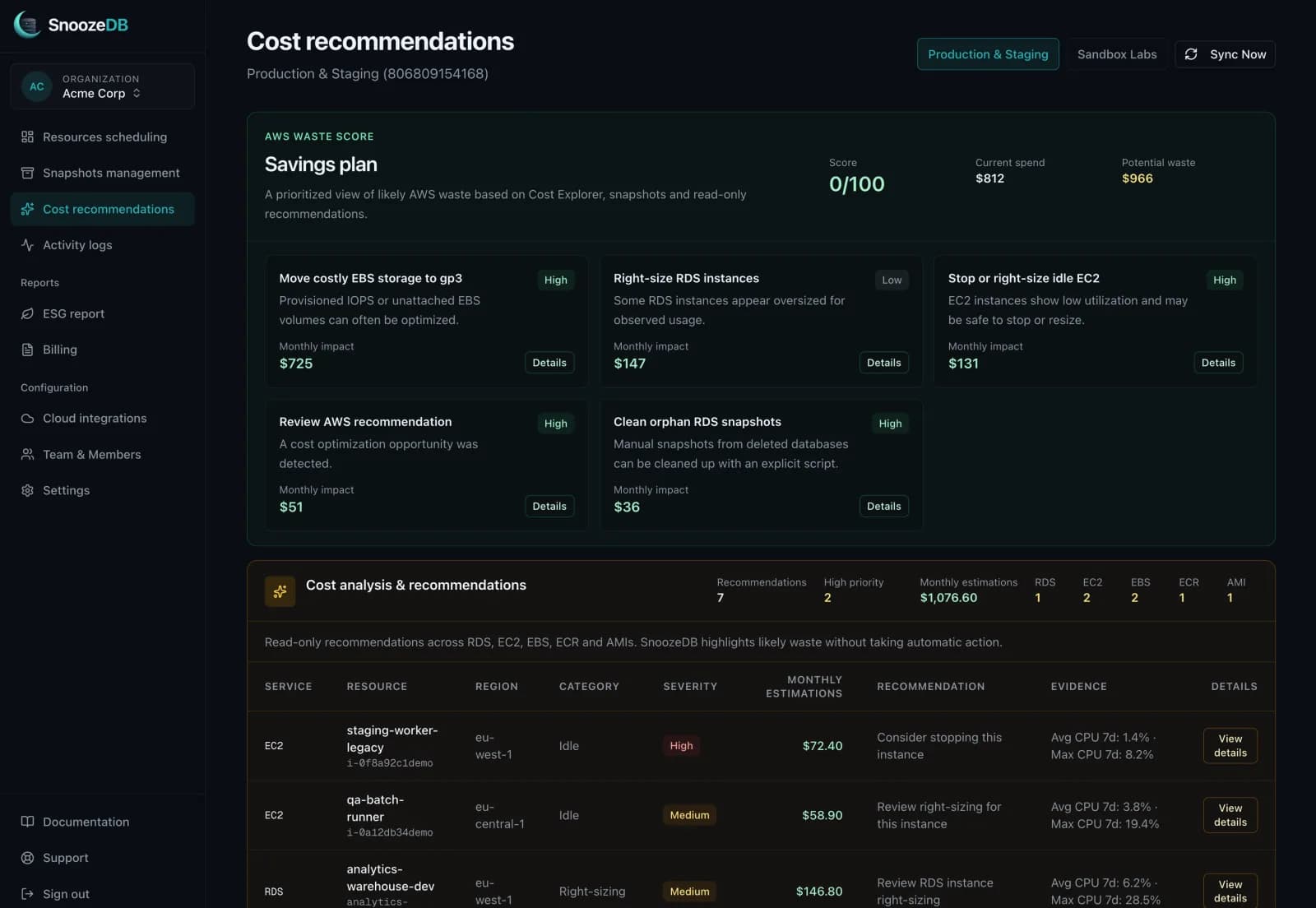
SnoozeDB's Waste Score compares detected monthly waste against the latest monthly AWS spend imported from Cost Explorer. The goal is to answer one operational question: how much of the current bill looks reviewable right now?
Core formula
Waste Score = 100 - ((estimated monthly waste / current monthly spend) * 100)
A score of 82 means the detected waste represents roughly 18% of the latest imported monthly AWS spend. If Cost Explorer is not enabled, SnoozeDB can still show recommendations, but the score should be treated as incomplete.
Current spend is not inferred from instance sizes. It comes from AWS Cost Explorer when that permission is enabled. Potential waste is the sum of active recommendations with a positive monthly savings estimate. Recommendations without reliable savings estimates can still appear in the table, but they should not inflate the score.
Data sources, thresholds, and recommendations
The methodology intentionally starts with conservative signals: inventory APIs, CloudWatch metrics, and Cost Explorer. SnoozeDB does not inspect application data, database rows, queries, or customer traffic payloads.
| Signal | Source | Current threshold | Confidence |
|---|---|---|---|
| Idle EC2 | CloudWatch CPUUtilization, 7 days | Average CPU < 5% | High for stop candidates at <= 2% |
| RDS right-sizing | CloudWatch RDS metrics, 7 days | Avg CPU < 10%, max CPU < 40%, free memory >= 512 MB | Medium by default |
| Orphan RDS snapshots | RDS snapshot and DB inventory | Manual snapshot source DB no longer exists | High, but cost is an upper-bound estimate |
| EBS storage | EC2 volume inventory | io1/io2 or unattached volumes | High for provisioned IOPS waste |
| ECR images | ECR image metadata | Untagged image older than 90 days | Medium to high depending on image size |
| AMI snapshots | EC2 AMI and snapshot inventory | AMI older than 90 days and not used by running instances | Medium |
Why 5% CPU for idle EC2?
EC2 idle detection currently uses CloudWatch CPUUtilization over the last 7 days, with one-hour datapoints. A running instance is considered idle when average CPU is below 5%. At or below 2%, the recommendation becomes a stronger stop candidate; between 2% and 5%, right-sizing is usually a safer first review.
Example: an m5.large running 24/7 at roughly $70/month with average CPU below 2% is likely high-confidence waste if it belongs to a dev worker, forgotten test box, or stale environment. If the same instance has low CPU but high network or disk usage, CPU alone is not enough to stop it. That limitation is intentional and visible.
RDS right-sizing is intentionally cautious
For RDS, SnoozeDB uses 7-day CloudWatch metrics: average CPU, maximum CPU, minimum freeable memory, and maximum database connections. A right-sizing candidate currently requires average CPU below 10%, max CPU below 40%, and at least 512 MB of freeable memory.
This does not yet mean "move db.m5.large to db.t3.medium" automatically. That class-to-class recommendation needs pricing, memory, workload, and engine-specific constraints. Today, the signal means: this database is worth reviewing before the next billing cycle.
How orphan RDS snapshots are detected
SnoozeDB lists manual and automated RDS snapshots, then compares each snapshot's source DB identifier with the current RDS database inventory. A manual snapshot is marked orphaned when its source database no longer exists in the account and region inventory.
Manual snapshot cost is estimated as allocated storage multiplied by $0.023 per GB-month. That is deliberately described as an upper bound: AWS bills unique incremental blocks, so a 500 GB snapshot does not always add 500 GB of billable storage. Cost Explorer or detailed billing remains the source of truth.
How this differs from AWS Trusted Advisor
AWS Trusted Advisor is useful for broad account hygiene, but its output is not designed around a team's day-to-day scheduling and cleanup workflow. SnoozeDB focuses on actionable resource-level waste across non-production databases, idle EC2, snapshots, EBS, ECR and AMIs, with explicit thresholds and reviewable evidence.
The point is not to replace native AWS billing tools. It is to make waste visible in the place where engineers can decide whether to stop, schedule, resize, ignore, or generate a cleanup script.
Where estimates can be wrong
- CPU-only EC2 detection can miss network, disk, memory, or rare batch workloads.
- Snapshot cost estimates can be higher than the actual bill because RDS snapshots are incremental.
- Regional pricing and negotiated discounts can make generic estimates differ from real spend.
- Cost Explorer data can lag and should be treated as billing-period data, not live metering.
- Right-sizing signals are review prompts, not automatic infrastructure changes.
How often should teams audit AWS waste?
Weekly is a good cadence for dev and staging accounts because temporary infrastructure becomes permanent quickly. Monthly is usually enough for stable production accounts, especially when paired with Cost Explorer review and anomaly detection.
If your main problem is non-production uptime, start with schedules:stopping RDS automatically and comparing approaches such asAWS Instance Scheduler. For a broader EC2 decision, compareAWS EC2 cost optimization tools. If your main problem is visibility, start with recommendations and connect Cost Explorer.
FAQ
This section answers methodology questions related to AWS waste detection. For product, security, billing, and setup questions, see the dedicated SnoozeDB FAQ.
How do you know an EC2 instance is idle?
SnoozeDB reads AWS/EC2 CPUUtilization from CloudWatch over the last 7 days with hourly datapoints. A running instance is flagged when average CPU is below 5%; instances at or below 2% average CPU are treated as stronger stop candidates.
What is an orphan RDS snapshot?
An orphan RDS snapshot is a manual snapshot whose source DB identifier is no longer present in the current RDS inventory. SnoozeDB marks it as orphaned but never deletes it automatically.
How much does an unused EBS volume cost per month?
The estimate depends on volume type and size. SnoozeDB currently estimates gp3-like storage around $0.08 per GB-month and provisioned IOPS storage around $0.125 per GB-month before IOPS charges.
Can AWS Trusted Advisor detect all cloud waste?
No single tool detects all cloud waste. Trusted Advisor is useful, but SnoozeDB focuses on scheduleable non-production resources, snapshot retention, and transparent resource-level thresholds designed for day-to-day FinOps triage.
What is the difference between paused and stopped RDS?
Stopped RDS is an AWS instance state where compute is shut down while storage remains. Paused in SnoozeDB usually means the automation schedule is temporarily disabled; the database itself can remain running.
How often should I run a cloud cost audit?
A lightweight audit should run weekly for fast-moving dev and staging accounts, and monthly for stable production accounts. A sync after major deployments or infrastructure migrations helps catch waste before it becomes a full billing cycle.
Find the AWS waste hiding in your account
SnoozeDB connects through a secure CloudFormation role, scans read-only cost signals, and turns them into reviewable recommendations. Start with RDS schedules, snapshot cleanup, and cross-service cost analysis.